
Google Analytics 360

An enterprise analytics tool that solves data issues for large-scale sites
and accelerates business growth
Google Analytics 360 (GA360) is the enterprise edition of Google Analytics, Google’s website and app analytics tool. GA360 addresses the data issues and advanced analytics needs of large-scale sites that the free Google Analytics 4 (GA4) cannot solve. In this way, it maximizes marketing ROI and powers data-driven management and operations.
Issues with the free GA4 tool that Google Analytics 360 (GA360) solves

If you recognize any of the following issues with using the free GA4 tool, your business has likely outgrown its limitations. GA360 solves these issues, empowering large-scale data analytics and advanced marketing strategies.
Incomplete or inaccurate data
Incomplete reports:The frequent appearance of rows marked “Other” in reports hints at hidden critical data. This obscures the bigger picture and leaves decision makers without essential information.
Reduced analytics accuracy:Automatic sampling during data exploration produces discrepancies with actual figures. Such discrepancies undermine reliable analyses and have an outsized impact on large-scale sites.
Limits on data retention and exports
Limited data retention period:Because data is retained for only 14 months, it is not possible to conduct comparative analyses over periods longer than two years. This hinders long-term trend analysis and the identification of seasonal patterns.
Export limit:Hitting the daily export limit to BigQuery (one million events per day) abruptly halts data integration, which constrains integration with other systems as well as custom analytics.
Key GA360 features and value provided to businesses
Large-scale data analytics and advanced data utilization
Unlimited data exports via BigQuery integration:
GA360 eliminates the export limit of the free GA4 tool, enabling virtually unlimited exports of event data (billions of events per day) to BigQuery. This facilitates the use of data in large-scale data analytic infrastructures and integrated analytics with other data sources.
Advanced analytic functions:
Subproperties: This function lets you extract or exclude specific events when verifying data. It is an alternative to the GA4 View function and allows for site-specific analyses, setting goals by departments, data filtering, and configuring viewing privileges. Half of the aggregated events are subject to billing.
Roll-up properties: This function lets you combine data from multiple properties for aggregate views. It is effective for gaining a broad picture while eliminating user duplicates across services. Half of the aggregated events are subject to billing.
Use cases: Subproperties are ideal for detailed analyses of individual services and advertising integration. Roll-up properties are optimal for gaining a general view across multiple services and regions.
Faster decision-making:
GA360 accurately analyzes large-scale datasets without worrying about data sampling. Visualize entire customer journeys through cross-device and offline data integration, for swift decision-making.
Advanced insight analytics:
GA360 provides more generous limits on custom reports and segments, which allows more detailed analyses and predictive analytics using machine learning.
Advanced marketing and promoting organizational-wide data utilization
Advanced marketing:GA360 provides seamless integration with the Google ecosystem, including Google Ads and Google Cloud. Integration with CRM and MA tools enables the provision of personalized customer experiences and increases the precision of marketing strategies.
Promoting organizational-wide data utilization:GA360 promotes secure data sharing and collaborative work with its functions that manage privileges. Custom alerts provide immediate detection of anomalies and trends, fostering a culture of data utilization throughout an organization.
Case study of GA360 data utilization
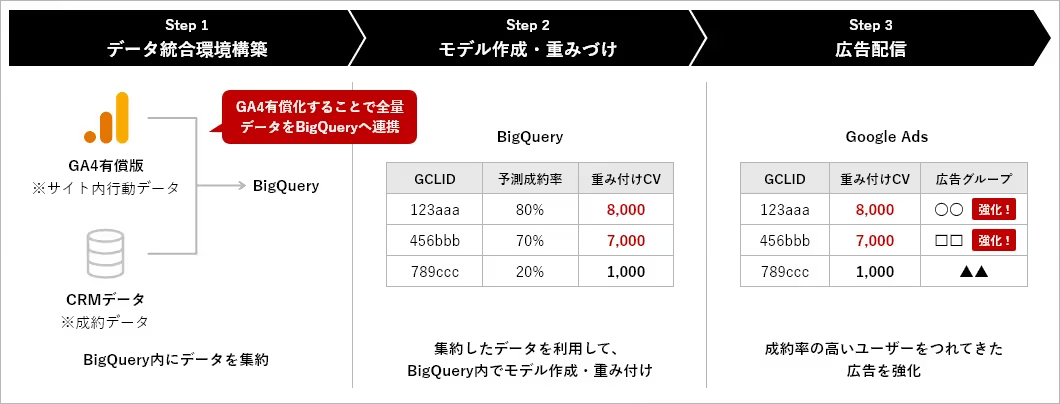
In this case study, Hakuhodo DY ONE successfully applied GA360 data to manage online ads for a real estate client.
Problem — Since the final conversions (signing contracts) occur at physical branches, web-only tracking was insufficient, preventing ad operations based on actual outcomes.
Solution — We cross-referenced final conversions from the customer database (contract data per user ID) with site logs (GA) and applied machine learning to analyze the data. The analysis predicted the conversions most likely to lead to final outcomes (contracts). By returning high values as conversions, we applied this data to the client’s ad operations.
Key considerations when deciding to adopt GA360
The best time to consider implementing GA360 varies depending on your business phase and challenges.
For companies already considering GA360
If any of the following apply to your business, now is the right time to implement GA360 to accelerate business growth.
- Monthly sessions: 25 million or more
- Annual sales: ¥5 billion or more
- Digital marketing budget: ¥50 million or more per year
- Have reached the BigQuery export limit
For companies not considering GA360 at the present time (using the free edition)
Even if you are currently using the free edition, it is time to consider upgrading to GA360 if any of the following apply to your business.
- Monthly PVs are rapidly increasing to the 5 to 10 million mark
- Quarterly growth rate is surpassing 20 percent
- Analytics requirements have become more complex with the addition of new businesses or service expansion
- Data utilization is becoming far more important due to digital transformations in your business or operations
- Need for data integration across multiple business units
- Planning full integration with CRM, MA, and BI tools
- Require enhanced governance in preparation for an IPO
- Need to improve reporting accuracy for investors
- Need to cross-reference data across multiple regions due to overseas expansion
Even if you are already using GA360, please feel free to contact us at Hakuhodo DY ONE if you are facing challenges with applying GA360.
